
Why Choosing the Right CNC Machine for Cabinet Making Matters

If you're looking at a cabinet making CNC machine for sale, here's a quick breakdown of what to know before you buy:
Best CNC machine types for cabinet making, by need:
| Your Situation | Best Machine Type | Starting Price |
|---|---|---|
| Small shop, custom work | 3-axis flatbed CNC router | ~$5,000–$20,000 |
| Mid-size shop, mixed production | ATC CNC router with vacuum table | ~$20,000–$50,000 |
| High-volume production | CNC nesting machine with drill bank | ~$50,000–$150,000+ |
| Tight budget | Used industrial CNC router | Varies widely |
Cabinet making has always demanded precision. But doing it by hand — or with outdated equipment — means slower output, more waste, and higher labor costs.
That's where CNC routers change everything.
A modern CNC router can cut, drill, and groove an entire cabinet panel in a single pass. Shops using CNC automation report up to 50% faster production times compared to manual methods. And smart nesting software alone can improve material utilization by up to 10% — which adds up fast when you're buying sheet goods by the pallet.
But not every CNC machine is built for cabinet work. The wrong choice can mean a machine that's underpowered for MDF, too small for full 4×8 sheets, or missing the drill bank you need for 32mm system holes.
This guide is designed to help you cut through the confusion — so you can find the right machine for your shop size, production volume, and budget.
Main Types of CNC Routers for Cabinet Production
When looking for a cabinet making CNC machine for sale, the first step is understanding the different categories of machinery available. Not all routers are built to tackle the demands of panel processing, and matching the machine design to your daily workflow is critical.

For cabinet shops, the three primary styles of CNC machinery include:
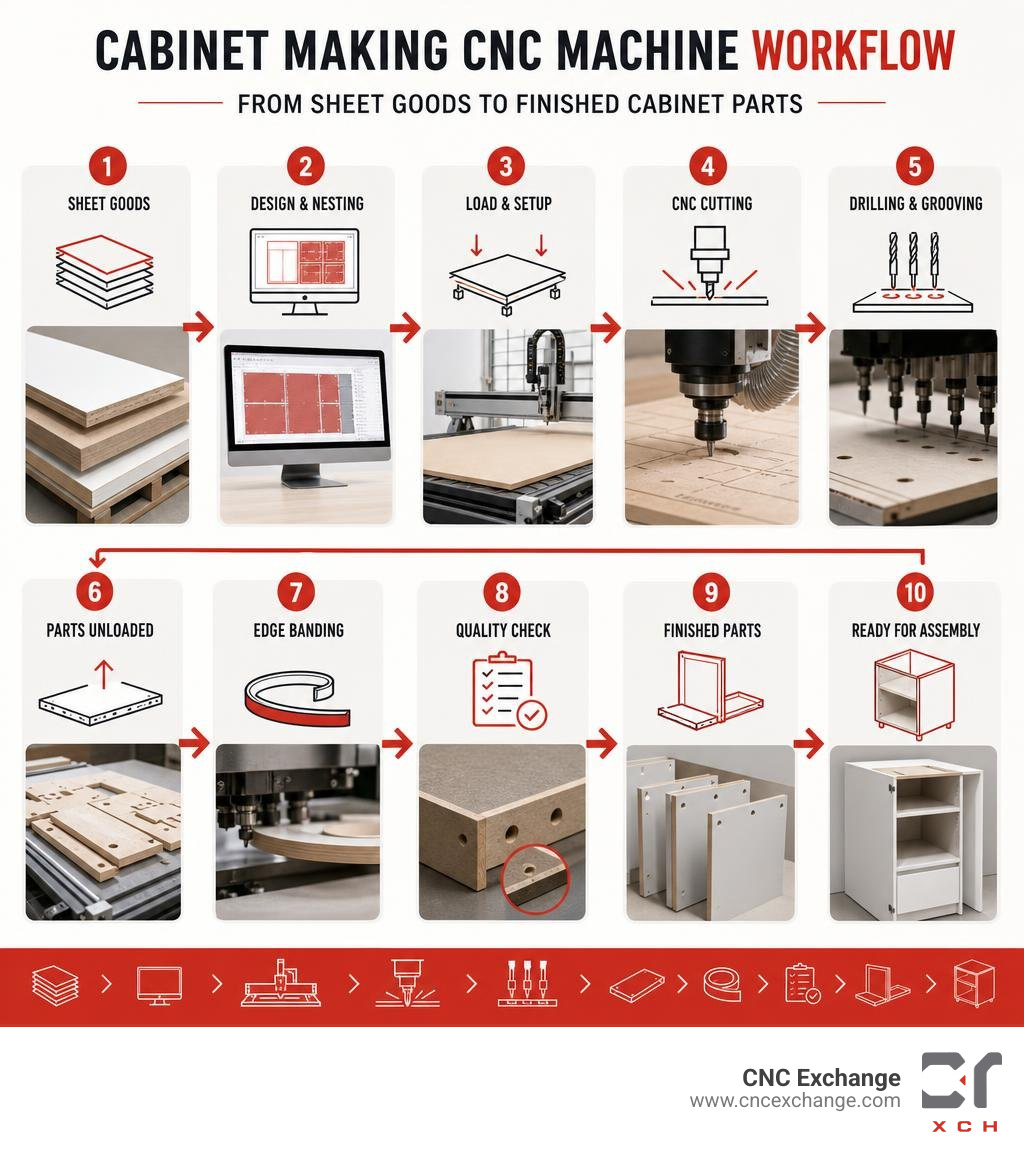
- Nesting CNC Routers: These are flatbed machines designed to process entire sheet goods (typically 4x8, 5x10, or larger). Instead of cutting individual parts to size on a table saw first, you lay down a full sheet of plywood or MDF. The machine cuts all the parts, drills system holes, and routs dados in a single cycle. This process maximizes material yield and minimizes handling.
- Flatbed CNCs: Often used in custom shops, these versatile platforms feature a solid grid table (usually phenolic or aluminum) that accommodates various pod-and-rail setups or direct vacuum clamping. They are excellent for shops that switch between sheet nesting and solid wood furniture parts.
- Point-to-Point Boring Machines: Unlike nesting routers, point-to-point machines work on pre-cut panels. Parts are fed into the machine, clamped by pneumatic grippers, and processed with high-speed drill heads and routing spindles. This is a staple of high-volume, European-style modular cabinet manufacturing.
By selecting an automated system like a Nesting CNC Wood Cutting Machine, small and mid-sized shops can achieve dramatic labor reductions. Rather than paying a skilled woodworker to measure, mark, saw, and drill each cabinet box component, a single operator can load a sheet, press start, and walk away to edge-band the previous batch.
3-Axis vs. 4-Axis vs. 5-Axis Configurations
The complexity of your cabinet designs will dictate how many axes of movement your machine needs.
- 3-Axis CNC Routers: The industry standard for cabinet box construction. The spindle moves along the X-axis (left-to-right), Y-axis (front-to-back), and Z-axis (up-and-down). This is all you need for cutting flat panels, drilling shelf holes, and milling dados.
- 4-Axis CNC Routers: These machines add a rotary axis (often a lathe-like attachment along the side of the bed or a aggregate head that can rotate). A 4-axis setup is ideal if your shop produces custom carved columns, decorative table legs, or needs to perform horizontal drilling on the edges of panels.
- 5-Axis CNC Routers: These advanced machines feature a spindle that can tilt and rotate in two directions while moving along the X, Y, and Z axes. While overkill for basic cabinet boxes, a 5-axis platform like the Quintax E5512 CNC Router is the ultimate tool for high-end architectural millwork, complex joinery, curved panels, and 3D molding.
Finding a Nested Cabinet Making CNC Machine for Sale
If your main goal is building kitchen cabinets, closets, and vanities, a nested-base CNC is your best path forward. Nesting software takes your cabinet designs and arranges the parts on a sheet of plywood like a jigsaw puzzle, aiming for maximum material yield.
When looking at nested systems, pay close attention to table size. A standard 4x8 table is the bare minimum, but upgrading to a 5x10 system like the Thermwood 5 X 10 WDH CNC Router allows you to process oversized sheets. This is particularly valuable when cutting tall pantry cabinets, large closet panels, or maximizing your yield by nesting smaller parts alongside larger ones.
True-shape nesting algorithms calculate the absolute best orientation for irregular parts, reducing your scrap pile to narrow ribbons of waste.
Key Features to Evaluate When Browsing a Cabinet Making CNC Machine for Sale
Buying a CNC router is a major investment. To ensure you don't end up with an underpowered machine that vibrates itself out of calibration, you must look closely at its structural build and mechanical components.

A quality cabinet CNC machine starts with a heavy, welded steel frame. Sheet goods are heavy, and moving a multi-horsepower spindle at speeds up to 1,000 inches per minute (IPM) creates immense kinetic energy. Cast-iron or thick-walled steel gantries absorb these vibrations, ensuring your cuts remain perfectly square and smooth.
For drive systems, you will generally choose between:
- Ball Screw Drives: Highly precise and rigid. They are excellent for Z-axis control and are often used on all axes of smaller, high-precision machines.
- Rack and Pinion Systems: Preferred for the longer X and Y axes on larger 4x8 and 5x10 machines. They allow for faster rapid traverse speeds and deep, aggressive cuts without sacrificing accuracy.
For shops seeking a complete, ready-to-run setup without the headache of sourcing separate components, exploring a PRO48xxRP CNC Turnkey Solution can streamline the path to active production.
Spindle Power and Automatic Tool Changers (ATC)
The spindle is the heart of your CNC router. For cutting dense materials like MDF, melamine, and hardwood plywood all day, you need a spindle with sufficient horsepower.
- Under 5 HP: Best suited for hobbyists or very light utility work. These spindles will require slower feed rates and multiple passes to cut through 3/4-inch material.
- 5 to 10 HP: The sweet spot for small-to-medium professional cabinet shops. They can easily cut through 3/4-inch plywood in a single pass at efficient speeds.
- 10+ HP: Industrial-grade spindles designed for 24/7 high-speed production.
To maximize efficiency, an Automatic Tool Changer (ATC) is non-negotiable. Without an ATC, your machine will stop every time it needs to switch from a drilling bit to a pocketing bit, requiring the operator to manually swap the tool and re-zero the Z-axis.
High-performance models like the CR-Onsrud 122C18 CNC Router utilize carousel or linear ATCs that swap tools in under 10 seconds. This drastically reduces overall cycle times and allows your operator to focus on assembly rather than babysitting the machine.
Vacuum Hold-Down Systems and Drill Banks
How you hold your material down is just as important as how you cut it. Mechanical clamps are slow and get in the way of the cutting path. Professional cabinet making requires a high-flow vacuum hold-down table.
A vacuum table is divided into multiple zones that can be turned on or off depending on the sheet size. A high-flow vacuum pump (typically 10 to 25 HP) pulls air right through a sacrificial MDF spoilboard, locking your plywood sheet firmly in place.
Equally important for cabinet box production is a dedicated drill bank (or boring block). While a single spindle can drill shelf pin holes one by one, a Linear ATC CNC Nesting Machine with Drilling Bank features a multi-spindle head (such as a 5+4 drill bank arranged in an L-shape). This allows the machine to bore multiple 32mm system holes or hinge cup holes simultaneously, reducing drilling times by over 60%.
Material Compatibility, Tooling, and Software Integration
Cabinet shops work with a wide range of engineered and solid woods. Each material behaves differently under the cutter, requiring specific tooling strategies to avoid ruined sheets.
- Plywood: Hardwood plywood has alternating veneer layers that are prone to chipping and tear-out on the top and bottom faces.
- MDF (Medium Density Fiberboard): Highly consistent and cuts beautifully, but it is extremely abrasive on tooling and generates massive amounts of fine dust.
- Melamine-Faced Particleboard: Notoriously fragile face material. Cutting melamine without the right bit will result in unsightly chipping along the cut line, making edge-banding difficult.
Selecting the Right Bits for Plywood, MDF, and Hardwoods
To achieve flawless edges and maximize tool life, you must match your router bits to the material:
- Compression Spiral Bits: The gold standard for nesting plywood and melamine. These solid carbide bits feature a down-cut spiral at the top and an up-cut spiral at the bottom. This compresses the fibers inward toward the center of the sheet, preventing tear-out on both the top and bottom faces.
- Down-Cut Bits: Excellent for shallow dadoes and pocketing, as they push chips downward, leaving a perfect top edge.
- Up-Cut Bits: Great for deep mortises or rapid material removal, as they pull chips up and out of the cut. However, they can cause tear-out on the top surface of veneered sheets.
Proper spoilboard management is also key. Your spoilboard must be regularly resurfaced (milled flat) using a large flycutter bit to ensure the vacuum suction remains uniform across the entire table.
Software Compatibility from CAD/CAM to G-Code
Your CNC machine is only as smart as the software driving it. The modern cabinet-making workflow relies on a seamless bridge between your design software and the machine's controller.
Most shops design their kitchens in specialized software like Cabinet Vision, Mozaik, or Cabinet Sense. These programs automatically generate the necessary nested layouts and convert them into G-code (the universal language that CNC machines read).
Before buying a machine, ensure its controller (such as Syntec, OSAI, or Mach4) has a reliable post-processor for your software of choice. Industrial systems like the SCM Routech CNC Router or various SCM Routech CNC Router models are highly regarded for their broad compatibility with leading CAD/CAM platforms, making software integration painless.
Financial Considerations: Pricing, ROI, and Buying Used
Investing in a CNC router requires careful budget planning. You must balance the upfront capital expenditure against the projected labor savings and increased throughput.
| Machine Tier | Typical Price Range (New) | Key Capabilities | Target Shop Size |
|---|---|---|---|
| Entry-Level / Light Duty | $5,000 – $20,000 | Manual tool changes, smaller tables (4x4 or light 4x8), stepper motors. | Hobbyists, startup custom shops, prototype builders. |
| Mid-Range Professional | $20,000 – $60,000 | Welded steel frames, 4x8 or 5x10 vacuum tables, 8-12 HP spindles, basic ATC, hybrid or servo motors. | Expanding custom cabinet shops, mid-volume commercial shops. |
| Industrial / High Production | $60,000 – $150,000+ | High-speed servo drives, 12+ tool ATCs, integrated drill banks, automatic loading/unloading tables. | High-volume cabinet manufacturers, multi-shift production plants. |
Price Ranges for Entry-Level, Mid-Range, and Industrial CNCs
While entry-level desktop units can be found for under $3,000, they are not designed to process full sheets of 3/4-inch plywood day in and day out. For commercial cabinet production, expect to invest at least $25,000 for a reliable, professional-grade mid-range machine.
For high-volume manufacturing, heavy industrial machinery like the Onsrud Panel Pro 288G16D CNC Router commands a higher price tag but delivers unmatched structural rigidity, speed, and long-term durability.
However, you don't always have to buy new. The used machinery market offers an incredible opportunity to acquire premium, industrial-grade CNC routers at a fraction of their original retail cost, allowing you to bypass the initial depreciation hit.
Evaluating ROI, Training, and After-Sales Support
When calculating your Return on Investment (ROI), look beyond the machine's purchase price. Consider:
- Labor Savings: A CNC router can replace the work of two to three bench carpenters, allowing you to reallocate your team's skills to assembly and installation.
- Material Yield: Smart nesting reduces waste, saving you thousands of dollars in sheet goods annually.
- Reduced Rework: Perfect, repeatable cuts mean parts fit together flawlessly the first time, eliminating costly mistakes.
Additionally, evaluate the training and support package. A high-end machine like the Buselleto Jet-4 WF XL CNC Router is only valuable if your team knows how to run it. Ensure you have access to setup support, operator training resources, and reliable replacement parts.
At CNC Exchange, we help shops of all sizes navigate these financial decisions by offering a secure, transparent marketplace to buy and sell used industrial CNC machinery.
Best Practices for Setup, Calibration, and Maintenance
Once your CNC router arrives at your shop, proper installation and ongoing maintenance are vital to keeping your cuts accurate and your machine running smoothly.
- Leveling: The machine's frame must be perfectly level and coplanar. Even a minor twist in the frame can lead to cuts that are out of square.
- Dust Collection: Wood dust is highly abrasive. You need a robust dust collection system (typically requiring 1,000+ CFM at the machine hood) to keep the linear rails and ball screws free of debris.
- Lubrication: Follow a strict lubrication schedule for all bearings, gears, and ball screws. Many industrial machines feature automatic oiling systems to make this simple.
Daily Calibration and Spoilboard Maintenance
To maintain tight tolerances, make daily calibration a habit:
- Warm Up the Spindle: Run the spindle at low speeds for 10-15 minutes before cutting to distribute bearing grease evenly and prevent premature wear.
- Verify Tool Lengths: Use your tool length sensor to calibrate new bits after every tool change.
- Check Your Spoilboard: Over time, cutting through sheets will leave shallow grooves in your spoilboard. Regularly flycut (resurface) the board to maintain a perfectly flat reference surface.
When utilizing advanced, heavy-duty machinery like a Thermwood C53 CNC Router, maintaining a flat spoilboard and a perfect vacuum seal is essential for preventing parts from shifting during high-speed cutting passes.
Safety Protocols and Dust Collection
CNC routers operate at high speeds with incredible force. Safety must always be your top priority:
- Emergency Stops: Ensure all operators know the location of every E-stop button on the machine and controller.
- Safety Enclosures & Light Curtains: Keep the cutting area clear of personnel while the machine is in motion.
- Proper CFM Dust Hoods: Ensure your dust collection is actively running to maintain clear visibility and prevent the buildup of explosive wood dust in your shop.
Frequently Asked Questions About Cabinet CNCs
How does nesting software reduce material waste?
Nesting software uses advanced algorithms to pack parts as tightly as possible onto a single sheet of material. Instead of making straight, manual cuts across a sheet (which leaves large, unusable offcuts), the software can rotate parts, nest smaller drawer faces inside larger cabinet backs, and utilize "true-shape" nesting to match irregular geometries. This can increase your material utilization by up to 10%, significantly reducing scrap.
What is the best cabinet making cnc machine for sale for small shops?
For small shops, a 3-axis flatbed CNC router with a 4x8 vacuum table and an 8-to-10 position Automatic Tool Changer (ATC) is the ideal starting point. It fits the footprint of standard sheet goods, handles the vast majority of cabinet box and door processing, and can run on single-phase or standard three-phase power without requiring a massive industrial footprint.
Can I run cabinet design software directly on any CNC router?
Not directly on the machine's physical controller. You design your cabinets in a CAD/CAM program (like Cabinet Vision or Mozaik) on an office computer. That software processes the designs and outputs "G-code" files. You then transfer those G-code files (via USB or network connection) to the CNC machine's controller (such as Syntec or Mach4), which executes the physical movements.
Conclusion
Upgrading to a CNC router is one of the most impactful decisions a cabinet maker can make. Whether you are a small custom shop looking to step up from a sliding table saw, or an industrial manufacturer optimizing your production line, the right machine will dramatically increase your speed, precision, and profitability.
If you are currently browsing the market for a cabinet making CNC machine for sale, you don't have to navigate the process alone.
At CNC Exchange, we specialize in helping businesses buy, sell, and auction used industrial CNC machinery. Based in Prospect Heights, Illinois, our team of experts is dedicated to helping you find high-quality, reliable equipment that fits your budget and production goals.
Ready to take your cabinet shop to the next level? Browse Used CNC Machinery for Sale on our marketplace today, or contact our team to discuss your specific machinery needs!